
Hey there, thanks for tuning in! This week we’ll be focusing on an enhancement for the Badges feature that allows you to customize the registration attributes that appear on your badge. To try this feature out, go to Badges in the event Console and open the details page, or click to create a new badge. There are two sections that will accept a custom registration attribute. The first is marked “Free text,” and that will add an attribute to the bottom text bar (if available in the template), with the default being already set to attendee type. To change this, enable “Free text” and then type the attribute, for example {company}, in braces. The second section is at the bottom of the sidebar, called “Open text.” You can adjust the placement of this free text space to show on the front, back, or both sides of the badge, and you can add any text that you’d like to appear here. Click Update content to add text to the chosen space on the badge. In the open text box, you can add registration attributes.
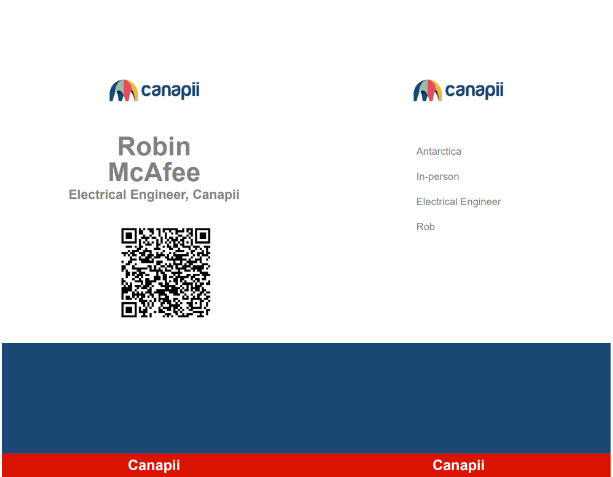
Each attribute should have its own line in the text box and appear in braces, as in the example below:
Country
Attendee Type
Job Title
Nickname
Click Save at the bottom of the badge details page to commit the changes. After the badge has been created, you can click “Print sample” to preview it. Now you’re all set! Here’s an example of a badge using the above list of customized registration attributes:
Click play button for video demonstration :
Please check out the full change log below, and the list below that for upcoming changes headed your way!
Full change log
New Features
Flights – Add file upload for flight confirmation
Add ability to disable default highlight banner
Add ability to target by invite code for all target attendee settings
Badge tool – Add ability to pull user data using placeholders
Enhancements
Instantly remove event access when attendee profile is disabled
Hotels – Add check in/check out column in attendee list export
QR – Improvements to loading speed and performance
QR – Scan Meeting Location
Highlight banner preview video – add ability to set default audio mute
Projects – Add ability to toggle image display in projects list
Attendee bio – Update UI
Remove checkbox option for attendees to see online
Auto translate QR module
Gamification – meeting/session check in rule update
Projects – Add pull to refresh in list page and project page
Push notification updates
Add target attendees column in FAQ list
Chat – Add target by attribute on create group chat
Remove date as a condition to update session details
Zoom Integration – Canapii Zoom: Convert JWT to SDK
Badge tool – Adjust print badge alignment
Badge tool – Update open text editor from markdown to html
Campaign tool update
Gamification – On-site control panel meeting/session check-in should award points
Hotels – Add room sections to availability overview
On-site console – Add location dropdown and update location sorting in meetings tab
Patch updates
Campaign tool – fix processCampaign error
Hotels – CSV import byte error
Comment stuck in sending queue when interactive tab is Moderated
Create meeting in console times out if too many attendee data
Gamification – Leaderboard does not updated on Pull to refresh
Chat:’Sending’ queue is not removed after being sent
Lag when liking/unliking a comment in event chat
Event/My Agenda – Showing of my agenda entries should refer to the start date for both views
Fail to Join a Zoom live breakout session if Zoom integration is Disabled
Flight – email matching is case sensitive
Gamification – issues should auto-refresh when settings are changed
My Agenda – small screen breakpoint
UI: Fix space between header and sticky date bar in my agenda
Agenda page filter is wrong after pull to refresh
Agenda settings error when meeting slot type is not defined
Gamification – Refresh indicator not working when page setting is empty
Error message when updating hotel details
Previous timezone is followed by Chats
Push notification chat 404 page on notification banner click
Session detail preview Null check operator used on null value
Campaign tool – Admin user unable to see Add Nomination in campaign destinations
Console dropdown menu in mobile responsive
Flights – not able to update status from approve to booked
Invalid date is showing in list/table date column after exporting
Notifications not loading
Roadmap Highlights
Upcoming changes next month
New features
FaceID login on compatible devices
Enhancements
Font choices pull through to microsite
Add tracks as filter option to microsite
Cropping tool for image uploader
Auto-update Open timeslot duration for meetings when Event duration is updated
Patch updates
Can only search attendees by name but not by job title and company when creating new chat
Setting the Target attendees following the Recommended toggle inside console Session page should update the app Recommended playlist accordingly
No notification count in session interactive Q&A tab for Attendee when privacy is set to public or moderated
Upcoming changes this quarter
New features
Ability to buy event tickets as a gift
Ability to restrict certain attendees to see/interact
Mobile app notification banners
Add a file opener on downloaded files in native app
Enhancements
SSO custom domain
Patch updates
Social media icon color in side menu follows the event’s branding primary color in native mobile app